
Top 11 SEO Browser Extensions for Daily SEO Tasks

Prefer doing SEO while browsing the web without having to open separate tabs multiple times? There are many extensions that can help with daily tasks, such as monitoring backlinks, analyzing on-page SEO, doing technical checks, researching keywords, or analyzing competitors.
We researched many solutions and made our list of the top 11 SEO plugins. All of them are available for Google Chrome, while some can also be used in other browsers. These tools below can help make your SEO routine simpler yet more productive.
1. LinkChecker.pro — Best for Comprehensive Link Monitoring and On-Page SEO Analysis
LinkChecker.pro extension is a Chrome extension for SEO that you can download from the Chrome Web Store for free. It is designed to simplify backlink monitoring and SEO analysis. It comes with features like:
Internal and external link scanning on a page, allowing you to review anchor text, redirects, and general page information in just a few clicks
Dofollow and nofollow link identification
Page indexing status check to confirm whether the page can actually be discovered by search engines
In addition, LinkChecker.pro offers automatic backlink tracking — just add the project and then receive instant alerts if a backlink or the donor page encounters any issues. Also, the plugin includes SEO analysis features so you can review important page details, such as:
Meta title and description
Word count
Language tag
Author
Last updated date
Here’s what the LinkChecker.pro Overview interface looks like when we open it on, for instance, the Forbes homepage:
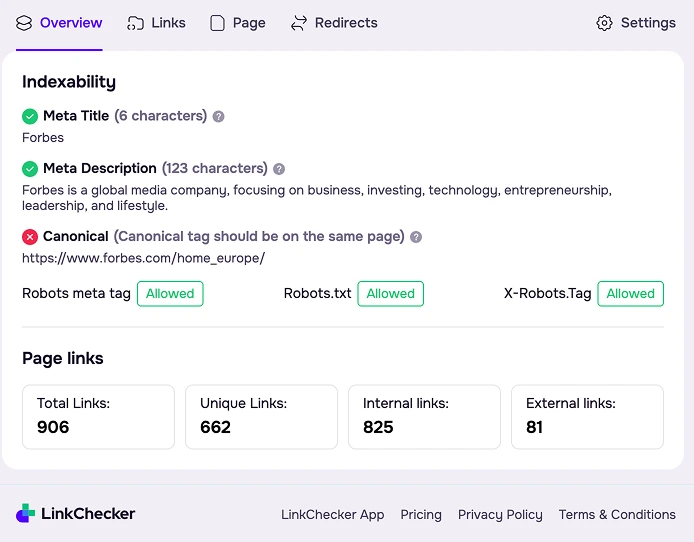
Overall, LinkChecker.pro is suitable for both quick link analysis and keeping an eye on backlinks placed across multiple domains. The tool works on most web pages, though some websites may have restrictions and limit link tracking features.
On top of that, you don’t have to create an account to start working. But as LinkChecker.pro is a full-featured SEO platform, not just an SEO Chrome extension, signing up for LinkChecker.pro gives you access to more advanced backlink monitoring and reporting functionality.
For instance, the platform also features brand mentions, link insertion alerts, and a budget tracker. Plus, with LinkChecker.pro project statistics and team management features, you can track progress and see how different team members perform.
2. Detailed — Best for On-Page SEO Audit
Detailed is a free on-page SEO Chrome extension. With the help of this tool, you can view key page data without having to manually check the source code. It takes a single click to get quick insights into:
Titles
Descriptions
URL
Canonical tags
X-Robots HTTP headers
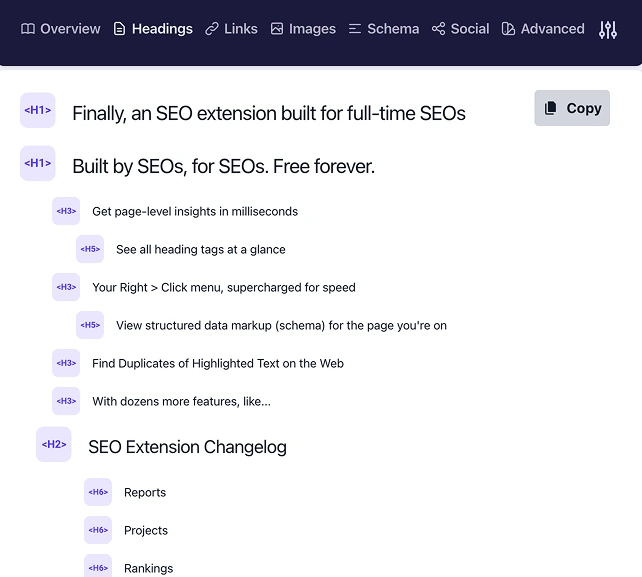
This SEO extension also shows all heading tags on a page (H1, H2, H3, etc.) in one place. The headings are shown in a list, so you can see if there are issues like an H1 tag that is missing, too many headings, or even headings that are present but are not optimized for SEO.
Structured data (schema markup) used on a page can be viewed directly in the extension. So, in some cases, it can even replace separate schema testing tools, since you can instantly see the markup directly in your browser.
Another useful feature is the ability to find duplicate text. By selecting a piece of text on a page, you can check whether the same content appears elsewhere online.
The Detailed plugin offers additional features like:
Exporting all links found on a page
Exporting all image URLs from a page into a CSV file
Extraction of “People Also Ask” questions directly from Google search results
Highlighting nofollow links on a page
A fast hreflang overview
Detailed brings many useful SEO analysis tools into the browser for free. Plus, the plugin is available not only for Chrome but also for Firefox.
3. Keyword Surfer — Best for Keyword Research Inside Google Search Results
Keyword Surfer by SurferSEO is a Chrome SEO extension for keyword and content research. If you’ve ever used SurferSEO, you’ll likely find the interface of this plugin very familiar.
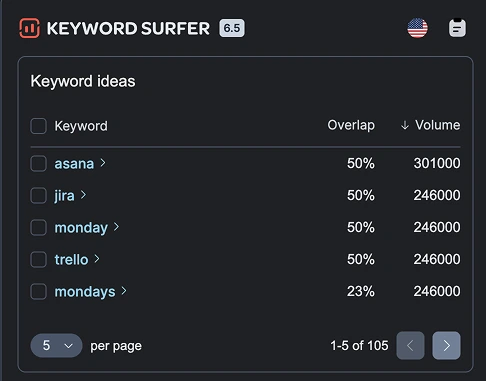
As soon as you search for a keyword, the extension displays keyword ideas next to the results page. You can see related terms along with the overlap score and search volu
Keyword Surfer also shows several additional data points on the search results page. These include:
Estimated traffic
The average word count of competing articles
Cost per Click (CPC)
The number of keywords used on competitor pages
Another good feature is keyword organization — saving your keywords into folders so you can keep an eye on them later. The lists can also be exported into CSV and shared with a team or used in other SEO tools.
With Keyword Surfer, you can analyze keywords from over 70 countries. This is valuable for international SEO. When looking at a specific country, you can analyze and understand what users are actually searching for in a specific market.
The plugin is regularly updated with new features. One of the recent updates allows it to be used in ChatGPT to make content read more naturally and to assess how human-like it may appear.
Keyword Surfer proved to be valuable when researching new content topics. You can assess keyword potential and gather topic ideas directly from the search results, and your workflow won’t be interrupted.
4. SEO Minion — Best for Multi-Location SERP Simulation
SEO Minion by Keywords Everywhere is an SEO checker extension for on-page SEO and SERP analysis. It’s available for Chrome, Firefox, and Microsoft Edge.
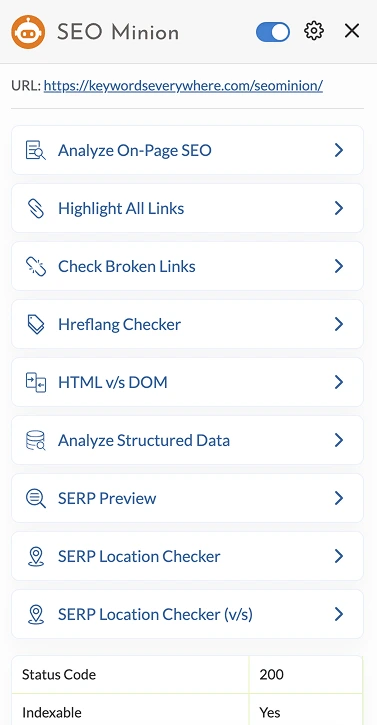
One of the features of SEO Minion is its on-page SEO analysis. With a single click, you can review page elements such as meta tags, headings, and Open Graph data.
Additionally, you can use SEO Minion to find redirect paths of your URL, detecting server, Meta Refresh, and JavaScript redirects, and scan all links on a page and highlight broken ones. The extension organizes them by their status codes. You can also use the plugin to highlight links on a page and filter them by internal or external links.
SERP analysis tools are also available in SEO Minion. For instance, you can see how your page will appear at the top of Google search results using the SERP preview function. You may check your rankings in other countries by using the plugin's feature that lets you search from multiple places.
Plus, you can analyze the SERP statistics and see what kinds of elements are included in the search results, such as videos, images, news, maps, etc.
SEO Minion includes many other tools for daily SEO tasks:
Checking hreflang tags
Analyzing structured data
Comparing HTML and rendered DOM
Scraping People Also Ask questions from search results
And it can export SERP data such as images, videos, news results, and maps into a downloadable file for further analysis.
5. Mangools — Best for SEO Research Suite for Keywords, Backlinks, and Rank Tracking
Mangools SEO Extension brings the core features of the Mangools SEO toolkit into your browser. You can take advantage of tools for:
Competitors’ keyword research
Keyword density checker
On-page SEO analysis
Backlink checker
Mangools allows you to analyze the keywords for which a site currently ranks, as well as the SEO position, search volume, estimated traffic, and PPC metrics for each keyword.
The keyword density checker lets you find the long-tail keywords that exist on a particular webpage. It tells you, for instance, the frequency of a term, where the term is used, and the density of the term.
The functionality of on-page SEO analysis allows you to assess the optimization of the page and the way the page could appear in the search results. You can see the Google SERP snippet, analyze the meta description, meta title, and structured data, and check the distribution of the keywords on the page.
In addition, the plugin includes a backlink checker tool that lets you view a list of a competitor’s backlinks. In the “Backlinks” tab, you can review metrics for each link, including:
Link strength (a metric developed by Mangools)
Source URL
Citation flow
Trust flow
Anchor text
Whether the link is dofollow or nofollow
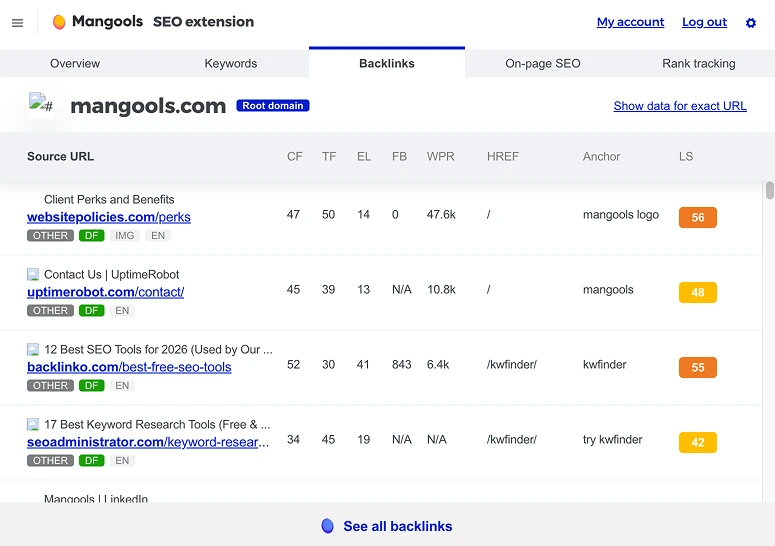
The Mangools SEO Extension also includes tools like a broken links checker and a rank tracking tool, along with several other useful solutions. And having these features directly in the browser makes it even easier to analyze websites and research competitors.
6. SEOquake — Best for Multi-Metric SERP Analysis
SEOquake is another versatile SEO checker Chrome extension with tasks such as:
SERP analysis
Keyword difficulty and density assessment
Internal/external link analysis
Depending on the type of SEO task or the kind of information you need, you can use a separate function. For example, when you enable the SERP overlay, a small analytics bar appears at the bottom of each search result, leaving you some handy metrics for each listing, as well as a sidebar for sorting the data and exporting the results.
SEOquake gives you access to such metrics as domain and page data, including Google and Bing index status, Semrush data, and other indicators of a site’s performance. And you can generate a detailed report for any page you’re analyzing.
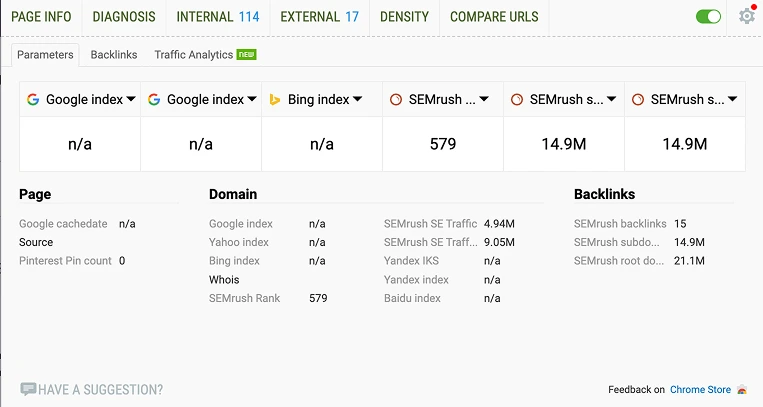
In addition, SEOquake can show how competitive a keyword might be to rank for and help analyze keyword density on a page and customize a stop-word list. Plus, it lets you run a detailed SEO audit of a webpage and determine different technical SEO issues and estimate how well the page works on mobile devices.
SEOquake can also display Facebook social statistics, making it easier to include social performance data in your SEO analysis. In a nutshell, this extension provides a wide range of information that can support everyday SEO analysis, from understanding search results to evaluating individual pages.
7. Ahrefs SEO Toolbar — Best for Multi-National SERP Analysis
Ahrefs SEO Toolbar is an SEO extension that allows you to use some of the Ahrefs tools directly on your browser. It lets you analyze your on-page SEO, perform international SEO research without a VPN, conduct a technical SEO audit, discover new link-building opportunities, and more. This tool is available on Chrome, Firefox, and Safari.
On-page SEO analysis is one of the Ahrefs SEO Toolbar features. You can use it to look at the title tag, meta description, heading structure, and overall word count.
Ahrefs SEO Toolbar also includes tools for analyzing Google search results. You can switch between different countries, languages, and Google domains and check search results from different locations.
Another helpful feature is link analysis. The toolbar can save time by highlighting all outgoing links on a page and filtering them by type. It detects broken or redirected links and allows you to export link data to a CSV file.
The Ahrefs SEO Toolbar can also help you to identify technical SEO problems from your browser. It lets you review hreflang links, canonical tags, noindex and nofollow directives, and more. It’s also possible to check all redirect chains and review the important signals for SEO contained in the HTTP headers.
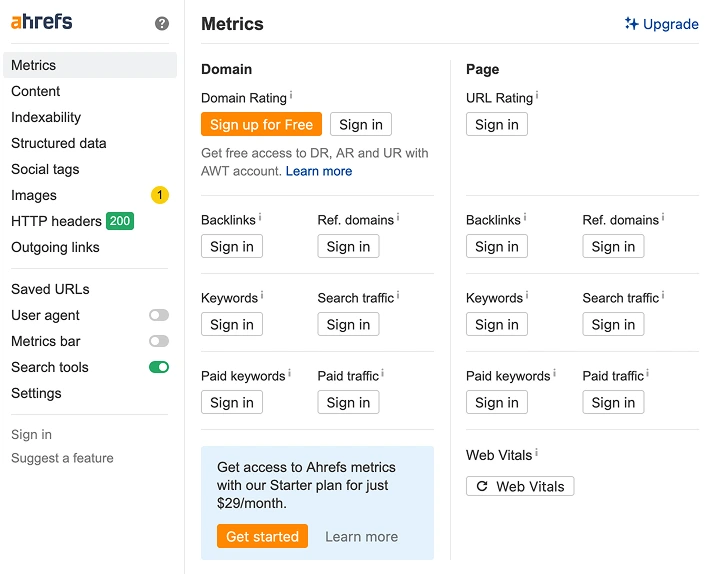
And if you have a paid Ahrefs account, you can also get access to the following metrics:
Domain rating
URL rating
Total number of backlinks pointing to the site or page
Referring domains
Estimated organic traffic coming from the search engine
Number of keywords the site ranks for in search results
8. MozBar — Best for Brand Authority Tracking
MozBar gives you quick access to SEO performance metrics and insights while you browse the web. When the toolbar is activated, you can see data for a website you visit, such as:
Page authority
Domain authority
Link counts
Using this SEO Chrome plugin, you can check on-page elements and compare link metrics directly in your browser. On the technical side, MozBar lets you check the schema markup used on a page. This makes it easier to see whether the structured data is set up correctly and how competitors implement schema on their pages.
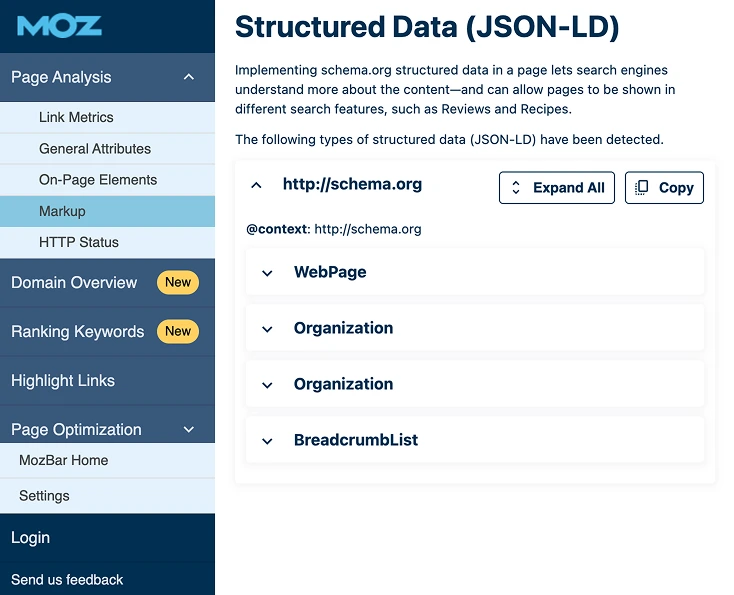
If you have a Moz Pro subscription, the extension unlocks a few additional metrics as well, including spam score and brand authority. Brand Authority is a score developed by Moz that measures the overall strength and recognition of a brand across the web. This can be especially helpful since brand authority isn’t always easy to judge, and the metric gives you a clearer point of comparison between websites.
Ranking Keywords is an additional premium feature that shows the 25 keywords for which a page ranks the highest. Alongside each keyword, you’ll see search volume and difficulty. This data can be exported for future use when you want to enhance rankings and create additional content.
MozBar is quite customizable. For example, you can switch to dark mode during long research sessions and choose where the toolbar appears in your browser so it doesn’t get in the way while you work.
9. Magneto — Best for Saving and Organizing Web Content Ideas
Magneto is a bit different from the other extensions on this list, as it works more as a content collection tool. The extension helps you save and organize content you find while browsing the web. This way, you don’t have to copy links or make screenshots — you can simply clip parts of a webpage and store them in your Magneto boards.

The extension allows you to create a “magnet” on any element of a page, such as a text, an image, or a link, after you log in.
The Chrome plugin can be very useful during research and content planning. For instance, you can save examples of competitor content that can inspire your own articles, useful statistics, examples of well-structured pages, and much more.
10. Link Research SEO Toolbar — Best for SERP Filtering by Link Authority and User Engagement
Link Research SEO Toolbar is a browser extension that helps users analyze websites and search results using different SEO metrics. It can be used for Firefox, Google, and Bing. You can install it as an SEO extension for Chrome.
The plugin allows you to sort search results based on
LRT Power*Trust for domains
LRT Power*Trust for pages
Number of keywords ranking
Buzz (social media activity around a page)
Impact (long-term user engagement)

You can also enable the toolbar that displays these SEO metrics on every page you visit. This way, you can quickly view the main SEO metrics for the page you’re on. In addition, such metrics are available within Link Research SEO Toolbar, such as link velocity trends and the number of backlinks.
The toolbar comes with three layout options — mini, bulky, and skyscraper. The mini version is a small bar that stays at the top or bottom of the page, while the bulky and skyscraper versions can be moved around freely to any location on your screen.
Additionally, in Link Research SEO Toolbar, there is a feature called "Highlight Nofollow Links." It marks the links that have the rel="nofollow" attribute on the pages you are visiting.
Link Research SEO Toolbar is very helpful when there is a need to know which pages deserve more attention and which ones can be ignored. For instance, it can help you identify strong competitor pages, find websites that may be good link prospects, or notice content that attracts both backlinks and engagement.
11. SimilarWeb — Best for Competitor Traffic Source and Global Ranking Analysis
SimilarWeb is an SEO stats Chrome extension that allows you to analyze how websites perform in terms of rankings, traffic, and audience engagement while browsing the web. You can use it as a keyword discovery tool, too. Along with Google Chrome, the plugin supports Firefox, Opera, and Microsoft Edge.
The extension provides several metrics that can assist with SEO and digital marketing analysis, including:
Website ranking
Traffic trends
Traffic sources (whether it’s through search, email, referrals, social, or ads)
Traffic by location
Top keywords
With SimilarWeb, you can easily follow traffic trends and see whether a site’s traffic is growing, staying stable, or declining. Additionally, you can assess the following:
Total visits over time
Bounce rate
Pages per visit
Monthly visit estimates
Average visit duration
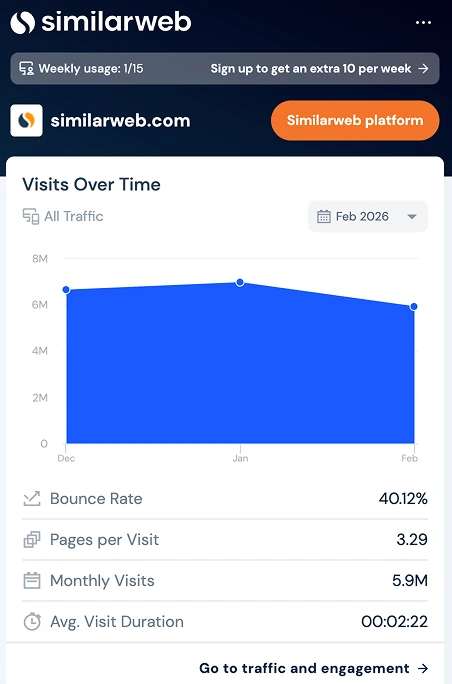
In addition, the extension provides keyword data, letting you review the top-performing and related keywords that drive traffic to a website.
Also, since the extension displays geographic traffic data (which countries bring the most visitors to a website and what percentage of total traffic comes from each location), you can understand where your website might stand in the market — if you open a competitor’s website, you can see its global and country ranking. This can help you set more realistic goals for growing your own traffic.
Plus, thanks to the Traffic Sources chart, you can assess what strategies your competitors rely on. For example, if you notice that a large share of a competitor’s traffic comes from paid search, it may indicate they are investing heavily in Google Ads. This may suggest that their organic SEO isn’t very strong, which could create an opportunity for you to compete with them in search results and potentially outrank them naturally.
FAQs
1. What SEO extension do you recommend for daily tasks?
Consider SEO Minion, Mangools, and Ahrefs SEO Toolbar if you want something versatile. All three extensions do a number of SEO tasks, such as page analysis, SERP checks, keyword research, and technical SEO audits.
If you want a more specialized solution (for example, for link monitoring), LinkChecker.pro would be quite good for link tasks. Generally, it’s a good idea to look at the specific functionality each extension provides and pick the ones that correspond to the kinds of SEO tasks you do most often.
2. What is the ultimate set of several SEO extensions?
You might use LinkChecker.pro for link tasks and Keyword Surfer for researching keywords and content ideas directly in Google's results.
SEO Minion or SEOquake can also help with on-page analysis, as well as SERP analysis, while MozBar or the Ahrefs SEO Toolbar are often used to evaluate website authority and review backlink data.
3. Are SEO Google Chrome extensions free?
Yes, extensions like LinkChecker.pro, Detailed, and some others are free. Other extensions may also be freemium, where you can use some basic functionality for free, but have to pay for advanced features. This is the case with MozBar.